Choosing the right Vinyl Software in 2026 requires more than comparing attractive screenshots or low subscription prices. Global buyers need dependable tools that connect design, cutting, printing, inventory, and customer communication. A polished interface helps, but reliable output matters more.
This guide examines leading platforms through practical buying criteria. These include file compatibility, cutting accuracy, cloud access, device support, automation, training resources, and total ownership cost. It also considers regional payment options, language support, data protection, and responsive technical service. Details matter. A small export error can waste meters of vinyl, delay an order, and weaken customer trust.
The comparison is designed for sign shops, apparel businesses, creative studios, and growing online sellers. Each software option should be tested with real projects, such as layered lettering, small decals, metallic materials, and a busy order queue. Trial performance can differ from daily production. That limitation deserves attention. I may favor platforms with clearer documentation and stable workflows, even when another product offers more advanced features. More features do not always mean better value.
Buyers should verify current pricing, hardware compatibility, renewal terms, and local support before committing. Software policies and product capabilities can change during the year. Independent testing, transparent vendor information, and user feedback provide stronger evidence than promotional claims alone. The goal is not to name one universal winner. It is to identify the Vinyl Software that fits your equipment, skill level, production volume, and long-term business plans.
2026 Top Vinyl Software for Global Buyers
What Is Vinyl Software and Who Needs It?
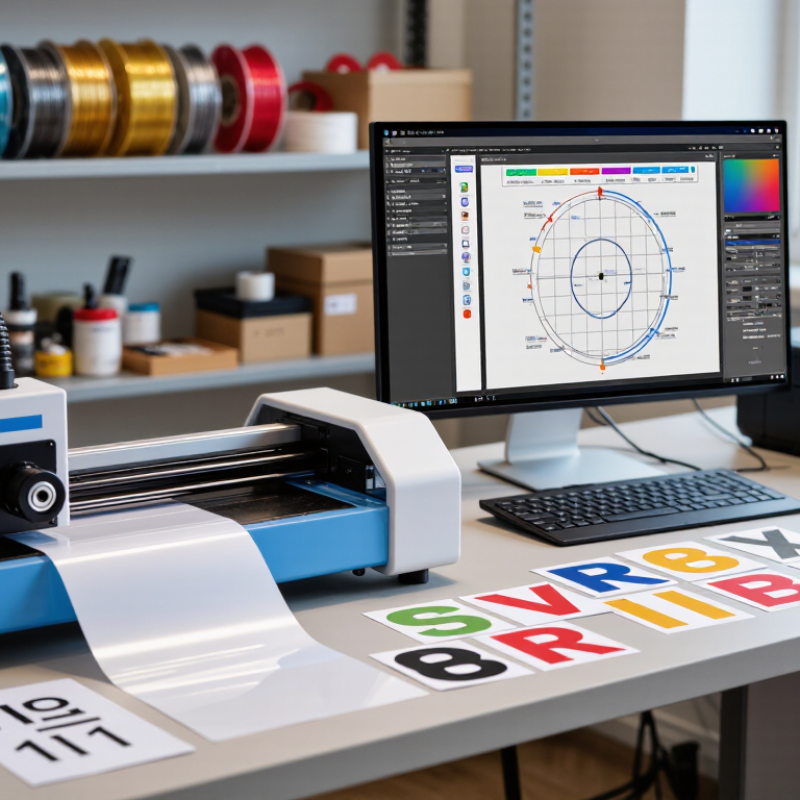
Vinyl software is a digital design and production tool for cutting vinyl sheets accurately. It helps users create decals, lettering, labels, heat-transfer graphics, and simple signs. Some programs also send cut instructions directly to compatible machines. It is not simply a drawing app. Accurate output matters.
Home crafters, sign makers, apparel decorators, schools, and small workshops may need vinyl software. A crafter might use it for a name sticker on a storage box. A workshop may prepare storefront lettering or packaging labels. Event teams can produce numbered signs and temporary displays. Users without cutting equipment may still need the software for design preparation. However, needs vary widely.
Practical buying decisions should focus on clear vector editing, reliable file imports, and adjustable cutting settings. Look for tools that handle scale, spacing, mirrored designs, and material pressure without confusion. Check language support, tutorials, updates, and customer assistance in your region. File compatibility can become a hidden problem. A low-cost license may become expensive if it requires extra conversion tools.
No software is flawless. Automatic tracing can misread fuzzy edges or small text. Users should inspect every design before cutting. That extra check feels slow, but it prevents wasted material. Global buyers should also consider payment methods, system requirements, and regional support hours. The best choice is rarely the most complicated one.
A practical comparison of vinyl-design and vinyl-cutting software categories for sign makers, garment decorators, craft users, print providers, and production teams.
| Software Category | Primary Function | Typical Users | Common Input Formats | Common Output or Cutting Formats | Key Features | Typical Skill Level | Indicative Cost Model | Best Use Case | Buyer Considerations |
|---|---|---|---|---|---|---|---|---|---|
| Entry-Level Vinyl Cutting Software | Creates simple artwork and sends cut paths to a compatible vinyl cutter. | Beginners, home crafters, schools, and occasional users. | SVG, DXF, PNG, JPG, and PDF, depending on the application. | Machine-specific cutting commands, SVG, and DXF. | Basic shapes, text tools, mirroring, weeding lines, simple tracing, and material presets. | Beginner | Free, one-time purchase, or low-cost subscription. | Small decals, labels, simple lettering, and hobby projects. | Check cutter compatibility, USB or network support, language options, and export restrictions. |
| Professional Sign-Design Software | Combines vector drawing, layout, typography, production planning, and cutting preparation. | Sign shops, vehicle-graphics providers, retail display producers, and print-service businesses. | AI, EPS, SVG, PDF, DXF, TIFF, PNG, and JPG. | PDF, EPS, SVG, DXF, and direct cutter or plotter workflows. | Advanced nodes, contour cutting, nesting, tiling, registration marks, color separation, and job management. | Intermediate to advanced | Perpetual license, subscription, or modular paid features. | Commercial signage, banners, window graphics, and vehicle wraps. | Evaluate large-format workflow support, spot-color handling, driver availability, and upgrade policy. |
| Vector-Illustration Software | Builds scalable artwork that can be edited before cutting or printing. | Graphic designers, branding teams, agencies, and experienced decorators. | SVG, AI, EPS, PDF, DXF, PNG, and JPG. | SVG, EPS, PDF, DXF, and raster previews. | Bezier curves, layers, compound paths, typography, gradients, clipping masks, and precise alignment. | Intermediate to advanced | Subscription, one-time license, or free open-source distribution. | Complex logos, layered artwork, custom illustrations, and reusable design systems. | Confirm that text can be converted to outlines and that overlapping paths can be combined correctly. |
| Garment-Decoration Design Software | Prepares artwork for heat-transfer vinyl, apparel layouts, and multi-layer garment applications. | Custom apparel shops, sportswear decorators, event suppliers, and online sellers. | SVG, PDF, EPS, AI, PNG, and JPG. | Mirrored SVG, PDF, EPS, DXF, and cutter-ready files. | Automatic mirroring, layer separation, color grouping, registration alignment, gang-sheet layout, and size scaling. | Beginner to intermediate | Free tier, subscription, or paid desktop license. | T-shirts, uniforms, bags, team apparel, and heat-transfer lettering. | Verify mirror settings, color-layer control, garment-size templates, and compatibility with transfer materials. |
| Print-and-Cut Workflow Software | Coordinates digital printing, registration marks, contour cutting, and final trimming. | Print shops, label producers, sticker sellers, and wide-format operators. | PDF, TIFF, PNG, JPG, SVG, EPS, and AI. | PDF, EPS, SVG, machine-ready cut files, and print queues. | Contour paths, registration marks, color management, bleed settings, nesting, tiling, and barcode-based job recognition. | Intermediate to advanced | Subscription, workstation license, or bundled production package. | Stickers, labels, decals, wall graphics, and short-run packaging. | Check support for printer-cutter combinations, spot colors, ICC profiles, and automated job tracking. |
| Raster-to-Vector Conversion Software | Converts bitmap artwork into editable vector paths suitable for cutting. | Users working with scanned logos, low-resolution artwork, customer images, or photographs. | PNG, JPG, BMP, TIFF, and scanned PDF. | SVG, DXF, EPS, PDF, and AI. | Automatic tracing, threshold control, noise reduction, smoothing, corner detection, and manual path editing. | Beginner to advanced | Free tool, one-time purchase, or subscription. | Single-color logos, line art, stencils, and simplified silhouettes. | Automatic tracing is not equally accurate for small details, gradients, shadows, or compressed images. |
| CAD and Technical-Pattern Software | Produces dimensionally accurate vector drawings and repeatable technical layouts. | Industrial designers, fabricators, packaging teams, and technical sign departments. | DWG, DXF, SVG, PDF, and AI, depending on the workflow. | DXF, SVG, PDF, and plotter-ready vector paths. | Exact dimensions, parametric geometry, layers, measurement tools, repeated patterns, and technical annotations. | Advanced | Subscription, perpetual license, or professional workstation license. | Templates, dimensional lettering, stencils, panels, and production patterns. | Confirm unit settings, scale accuracy, curve conversion, and compatibility with the cutting machine's software. |
| Cloud-Based Collaborative Design Software | Enables browser-based design, file sharing, review, and basic production preparation. | Distributed teams, educators, small businesses, and users working across multiple devices. | SVG, PNG, JPG, PDF, and selected vector formats. | SVG, PDF, PNG, and downloadable cut files. | Cloud storage, templates, shared projects, version history, browser access, and team comments. | Beginner to intermediate | Free plan, subscription, or usage-based features. | Remote collaboration, quick promotional graphics, and shared design libraries. | Review offline access, data storage location, export resolution, privacy terms, and machine connectivity. |
| Production-Nesting and Job-Planning Software | Arranges multiple designs to reduce material waste and organize cutting jobs. | High-volume sign shops, apparel producers, packaging manufacturers, and contract fabricators. | SVG, EPS, PDF, DXF, AI, and machine-specific job files. | Optimized cut paths, tiled layouts, production queues, and machine-ready files. | Automatic nesting, roll-width settings, material estimation, duplicate handling, job batching, and waste reporting. | Intermediate to advanced | Professional subscription, module fee, or enterprise license. | Batch production, long roll materials, repeat orders, and cost-sensitive operations. | Compare nesting logic, roll and sheet support, barcode workflows, reporting, and integration with existing equipment. |
Note: File compatibility, cutter connectivity, pricing, and available features vary by software version, operating system, equipment driver, and regional distribution terms. Always test a sample file before placing a production order.